

 Set up docs MCP
ClickStack exposes a REST API for programmatically managing dashboards, alerts, and data sources. The API is available for both Managed ClickStack (ClickHouse Cloud) and ClickStack Open Source deployments, though the endpoints and authentication differ between the two.
API reference documentation
For Managed ClickStack, the API is accessed through the ClickHouse Cloud API. The ClickStack endpoints are available in the Cloud API reference.
The following endpoints are available:
| Resource | Operations |
|---|---|
| Dashboards | Create, list, get, update, and delete dashboards |
| Alerts | Create, list, get, update, and delete alerts |
| Sources | List data sources |
For ClickStack Open Source, the full API specification is maintained in the HyperDX repository and can be viewed interactively or downloaded as an OpenAPI spec:
The following endpoints are available:
| Resource | Operations |
|---|---|
| Dashboards | Create, list, get, update, and delete dashboards |
| Alerts | Create, list, get, update, and delete alerts |
| Charts | Query time series data (POST only) |
| Sources | List data sources |
| Webhooks | List webhooks |
Authentication
Managed ClickStack uses the ClickHouse Cloud API key for authentication via HTTP Basic Authentication. To create and manage API keys, see Managing API keys.
Include the key ID and secret using HTTP Basic Authentication:
export KEY_ID=<your_key_id>
export KEY_SECRET=<your_key_secret>

curl --user $KEY_ID:$KEY_SECRET \
  https://api.clickhouse.cloud/v1/organizations/<ORG_ID>/services/<SERVICE_ID>/clickstack/dashboards
ClickStack Open Source uses a Bearer token for authentication via a Personal API Access Key.
To obtain an API key:
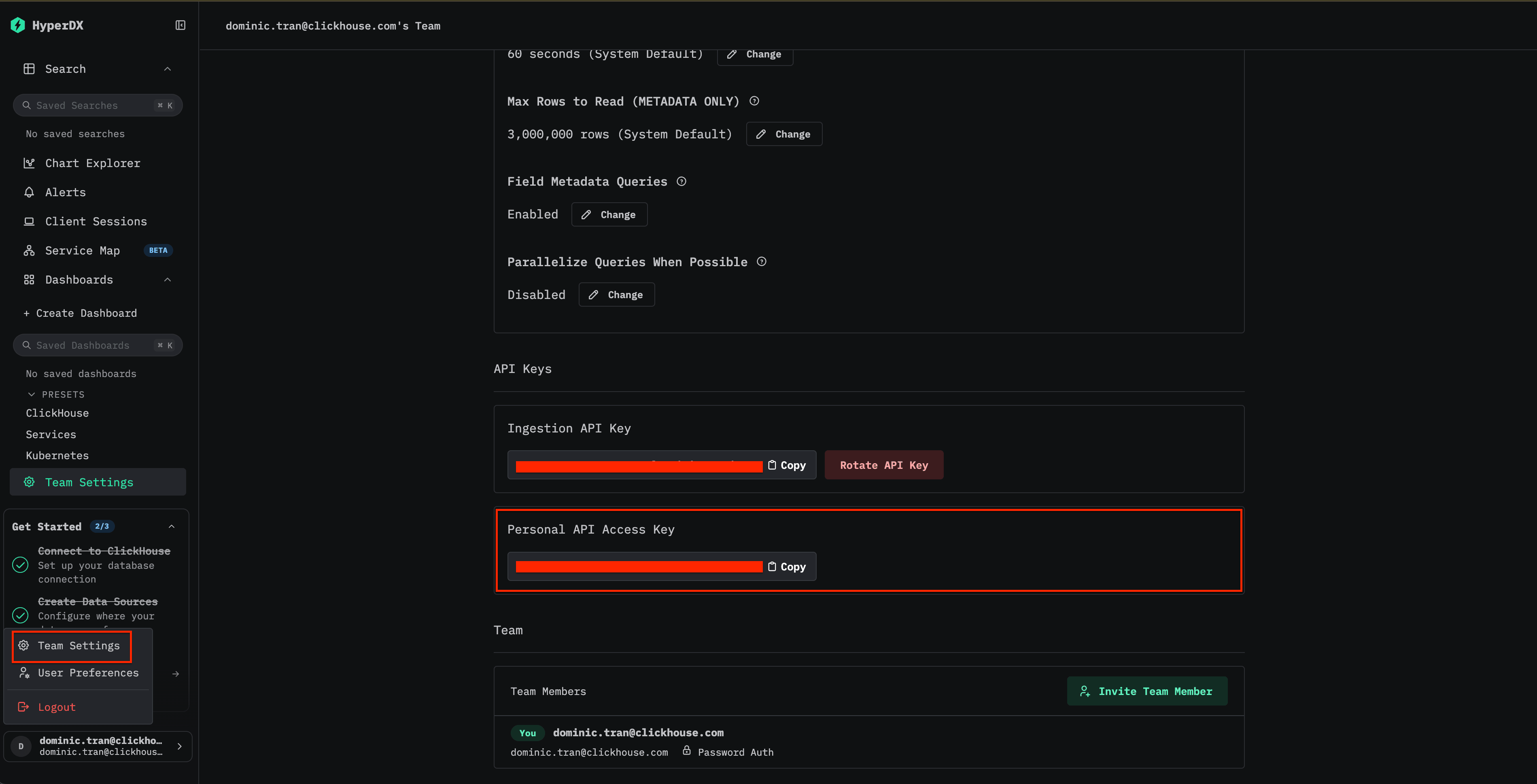
- Open HyperDX at your ClickStack URL (e.g., http://localhost:8080)
- Create an account or log in if needed
- Navigate to Team Settings → API Keys
- Copy your Personal API Access Key
The API server runs on port 8000 by default (separate from the UI on port 8080). When using the all-in-one Docker image, ensure you map this port explicitly:
docker run -p 8080:8080 -p 8000:8000 -p 4317:4317 -p 4318:4318 docker.hyperdx.io/hyperdx/hyperdx-all-in-oneInclude the key in the Authorization header:
curl -H "Authorization: Bearer <YOUR_API_KEY>" \
  http://localhost:8000/api/v2/dashboards
Base URL and request format
All Managed ClickStack API requests are sent to the ClickHouse Cloud API:
https://api.clickhouse.cloud/v1/organizations/<ORG_ID>/services/<SERVICE_ID>/clickstack/<resource>You can find your Organization ID in the ClickHouse Cloud console under Organization → Organization details. Your Service ID is visible in the service URL or on the service details page.
Example: List dashboards
curl --user $KEY_ID:$KEY_SECRET \
  https://api.clickhouse.cloud/v1/organizations/<ORG_ID>/services/<SERVICE_ID>/clickstack/dashboards
Example: Create an alert
curl -X POST --user $KEY_ID:$KEY_SECRET \
  -H "Content-Type: application/json" \
  -d '{
    "dashboardId": "<DASHBOARD_ID>",
    "tileId": "<TILE_ID>",
    "threshold": 100,
    "interval": "1h",
    "source": "tile",
    "thresholdType": "above",
    "channel": {
      "type": "webhook",
      "webhookId": "<WEBHOOK_ID>"
    },
    "name": "Error Spike Alert",
    "message": "Error rate exceeded 100 in the last hour"
  }' \
  https://api.clickhouse.cloud/v1/organizations/<ORG_ID>/services/<SERVICE_ID>/clickstack/alerts
All Open Source ClickStack API requests are sent to the HyperDX API server on port 8000:
http://<YOUR_HYPERDX_HOST>:8000/api/v2/<resource>For example, with a default local deployment:
http://localhost:8000/api/v2/dashboardsExample: List dashboards
curl -H "Authorization: Bearer <YOUR_API_KEY>" \
  http://localhost:8000/api/v2/dashboards
Example: Create an alert
curl -X POST \
  -H "Authorization: Bearer <YOUR_API_KEY>" \
  -H "Content-Type: application/json" \
  -d '{
    "dashboardId": "<DASHBOARD_ID>",
    "tileId": "<TILE_ID>",
    "threshold": 100,
    "interval": "1h",
    "source": "tile",
    "thresholdType": "above",
    "channel": {
      "type": "webhook",
      "webhookId": "<WEBHOOK_ID>"
    },
    "name": "Error Spike Alert",
    "message": "Error rate exceeded 100 in the last hour"
  }' \
  http://localhost:8000/api/v2/alerts
Example: Query chart series data
curl -X POST \
  -H "Authorization: Bearer <YOUR_API_KEY>" \
  -H "Content-Type: application/json" \
  -d '{
    "startTime": 1647014400000,
    "endTime": 1647100800000,
    "granularity": "1h",
    "series": [
      {
        "sourceId": "<SOURCE_ID>",
        "aggFn": "count",
        "where": "SeverityText:error",
        "groupBy": []
      }
    ]
  }' \
  http://localhost:8000/api/v2/charts/series